5 Hidden Features of the Deathadder V2 X Hyperspeed You Must Know About
The Deathadder V2 X Hyperspeed is often praised for its comfortable ergonomic shape and reliable wireless performance, but beneath the headline specifications lie lesser-known features that can meaningfully change the user experience. This article uncovers five of those hidden capabilities, explains how they help in real-world scenarios, and offers practical advice for buyers who care about performance, ergonomics, and long-term value.
Introduction
At first glance, the Deathadder V2 X Hyperspeed looks like a straightforward ergonomic gaming mouse: familiar silhouette, two main buttons, a few side switches, and wireless connectivity. For many buyers, the sale is made on feel and brand reputation. Yet competitive players, content creators, and heavy daily users will find that a handful of under-the-radar features separate a good wireless mouse from a truly flexible tool. This article breaks down those features, why they matter, and how to take advantage of them without relying on hype or marketing slogans.
Why these hidden features matter
Not all users are chasing the highest DPI or the flashiest RGB. Typical concerns include latency for fast reflexes, battery endurance during travel or streams, ability to preserve muscle memory across systems, and fine control for productivity workflows. The Deathadder V2 X Hyperspeed contains several design and software elements that address these needs in subtle but practical ways. Understanding and enabling these options can lead to immediate gains in comfort, accuracy, and reliability.
Five hidden features explained
1. Adaptive Hyperspeed Wireless Behavior
Beyond simply being "wireless," the Hyperspeed implementation on this model includes adaptive frequency handling and power-aware polling behavior. In practical terms, the mouse continually optimizes its radio link to reduce momentary interference and maintain low-latency performance—especially in environments crowded with other 2.4 GHz devices.
Real-world use case: In a dorm room, LAN event, or office with many Wi‑Fi networks and wireless peripherals, users often report micro-stutters or inconsistent performance. The Hyperspeed adaptive behavior reduces those incidents by switching channels and adjusting link parameters dynamically, which keeps fast-paced aim and cursor movement steady during long sessions.
2. Onboard Profile Storage and Quick Profile Switching
Many buyers assume wireless mice always depend on software for profiles. The Deathadder V2 X Hyperspeed provides onboard profile storage that allows users to store DPI curves, button assignments, and lighting settings directly on the device. More importantly, the mouse supports quick switching between profiles without digging into software mid-game or mid-presentation.
Real-world use case: A streamer can switch from a high-DPI profile for desktop navigation to a low-DPI profile used in shooter games without re-plugging or pausing software. Similarly, an office worker who uses specialized macros for spreadsheets can move between machines and retain their muscle memory when the onboard profile is active.
3. Surface and Lift-off Optimization
Small adjustments to lift-off distance and surface calibration are often overlooked, but they make a measurable difference in tracking consistency. The mouse lets users tune lift-off behavior so that short, corrective lifts (common in fast flicks) do not register unwanted movement, while still allowing clean re-placement tracking.
Real-world use case: Competitive gamers who use low-sensitivity settings make frequent small lifts during aim corrections. Tuning lift-off distance reduces accidental micro-aiming errors. Designers or photographers who require pixel-perfect placement can calibrate the sensor for the desk pad in use to minimize jitter and maintain smooth pointer motion.
Find top-rated Electronics products at great prices.
View Offers →4. Power-Management Modes — Fast-Charge and Low-Power Tradeoffs
Aside from advertised battery hours, the Deathadder V2 X Hyperspeed features practical power-management tweaks. These include an efficient low-power mode that reduces polling while idle and a fast-charge behavior that returns significant runtime after short connection times. The implementation aims to balance uninterrupted use with safety and longevity.
Real-world use case: A content creator on a tight schedule can plug the mouse in for 10–15 minutes between takes and regain enough charge for several hours, rather than waiting for a full cycle. Business travellers can use the low-power idle mode during transit to extend battery life and reduce the frequency of full recharges during multi-day trips.
5. Custom Button Assignment with Secondary Function Layers
Beyond simple remapping, the mouse supports multi-layer button functions—essentially letting certain buttons act as modifiers to unlock secondary assignments. That layer-based approach creates a compact macro system without needing additional hardware or software windows open during use.
Real-world use case: A spreadsheet user can make one side thumb button act as a modifier so that a second thumb tap triggers a different macro. A gamer might set a grenade throw on the primary side button and use the modifier to map quick-swap or chat macros, keeping both actions easy to reach without stretching the hand or adding dedicated macro keys.
Detailed product analysis
These hidden features emerge from a combination of hardware choices and the companion software ecosystem. The Deathadder V2 X Hyperspeed pairs a familiar ergonomic shell with a wireless radio designed for minimal latency and a sensor system tuned for reliable tracking. The software layer provides the tuning options—profile storage, surface calibration, button layers, and power-management settings—that convert those hardware capabilities into usable advantages.
Ergonomics and build: The Deathadder family name is associated with a large, palm-friendly shape. For users who prefer a palm grip or a relaxed claw, the contour supports long sessions without hand fatigue. The textured grips and side buttons are positioned to be reachable without repositioning the hand. The underside typically includes PTFE feet for smooth gliding; regular cleaning and occasional replacement of glide tape can preserve the feeling for years.
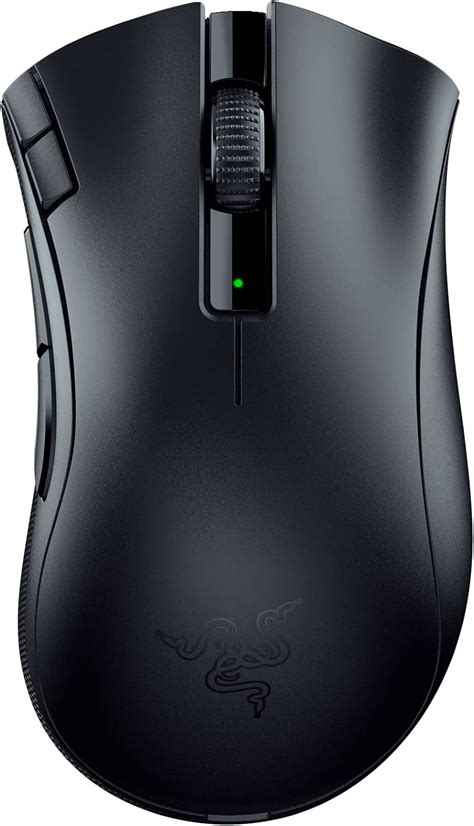
Sensors and tracking: While marketing often highlights raw DPI numbers, what matters in application is reliable tracking across surfaces and stable acceleration-free behavior. The combination of lift-off tuning and surface calibration gives the sensor a practical edge: it reduces jitter on imperfect surfaces and prevents accidental displacement during common lift-and-place gestures.
Software and firmware: The companion software is where many hidden features are revealed. Firmware updates can expand behavior or improve latency, so periodic checks for updates are recommended. The software also provides the user interface for building layers, storing profiles onboard, and fine-tuning power preferences.
Pros & Cons
- Pros:
- Low-latency wireless behavior suitable for fast-paced gaming and responsive desktop use
- Onboard profile storage preserves settings across systems without software
- Customizable lift-off distance and surface calibration improve tracking accuracy
- Layered button assignments enable compact macro workflows without extra keys
- Fast-charge behavior and efficient idle power modes aid mobile and long-session use
- Cons:
- Large palm-oriented shape may not suit smaller hands or fingertip grip preferences
- Advanced features require familiarity with software; out-of-the-box users may miss tweaks
- Wireless radio, while robust, still needs occasional firmware updates to maintain best performance
- Onboard profile capacity is limited compared with cloud-backed solutions—users with many workflows may still rely on software
Comparison table: How it stacks up in practical terms
| Aspect | Deathadder V2 X Hyperspeed (practical) | Typical compact wireless competitor (practical) | Typical budget wired gaming mouse (practical) |
|---|---|---|---|
| Latency in crowded environments | High resilience — adaptive radio helps reduce interference | Moderate — small form factor radios may be less adaptive | Stable — wired by design but limits mobility |
| Ergonomics | Large/palm-friendly — excellent for long sessions | Compact — better for fingertip grips | Varies widely — many are smaller to suit more hand sizes |
| Onboard customization | Yes — profiles, button layers, lift-off tuning | Sometimes — depends on model | Rare — relies on software only |
| Battery & charge convenience | Good — fast-charge advantages and power modes | Variable — may be optimized for ultra-light weight | Not applicable |
| Best for | Comfort for long gaming or productivity sessions | Travel and compact setups | Cost-conscious gamers who prefer wired reliability |
Buying guide: What to look for and how to make it personal
When evaluating the Deathadder V2 X Hyperspeed or similar mice, buyers should focus on a few practical decision points rather than headline specs.
Looking for the best Electronics deals on Amazon?
Browse Now →Grip and hand size
The first consideration is whether the shape fits the user’s hand and typical grip. The Deathadder line is optimized for larger hands and palm grips. If the buyer uses a fingertip grip or has a smaller hand, testing the shape in person or comparing hand measurements against manufacturer dimensions is recommended.
Latency needs and environment
Competitive players should prioritize low and stable latency. Wireless technology is now capable of parity with wired in many contexts, but crowded wireless environments remain a challenge. Look for radios with adaptive interference handling or consider a wired backup for tournaments where absolute certainty is required.
Customizability and workflow
Consider how often the buyer switches contexts. If a user frequently toggles between gaming, streaming, and productivity, onboard profile storage and layered button assignments are highly valuable. Buyers who rarely change settings can accept simpler models.
Battery life and charging habits
Think about charging routines. Fast-charge features are ideal for users who can insert short top-ups between tasks. If long stretches away from a charger are common, prioritize models known for conservative idle behavior and efficient power draw.
Software and long-term support
Check the ecosystem around the device. Software that receives frequent updates and has a straightforward interface will make unlocking hidden features much easier. Verify firmware update procedures and whether profiles can be backed up or exported.
Surface and desk pad considerations
Sensor performance depends on the surface. Users with glossy or highly textured desks should either use a dedicated mouse pad or ensure the model supports surface calibration. Lift-off tuning is particularly beneficial for low-sensitivity users and should be tested when possible.
Practical tips to unlock hidden features
- Install and explore the companion software: Many of the hidden behaviors are not enabled or are left at defaults. Spend time with the profile and sensor sections to enable fine-tuning.
- Calibrate for your desk pad: Run surface calibration to reduce jitter and ensure the sensor interprets movements accurately across the chosen pad.
- Store essential profiles onboard: Save a default productivity and a default gaming profile to the device so it retains critical settings when used on systems without the software installed.
- Use quick-charge windows: When the mouse supports fast charging, short top-ups can yield hours of use—plan these during natural breaks like map loads or meeting transitions.
- Update firmware regularly: Wireless behavior and sensor improvements often come via firmware. Periodic checks can resolve subtle issues.
Conclusion
The Deathadder V2 X Hyperspeed offers more than a comfortable shape and reliable wireless link. Its adaptive radio behavior, onboard profile storage, adjustable lift-off and surface tuning, practical power-management features, and layered button assignments make it a versatile tool for gamers, creators, and professionals alike. These hidden features reward users who take a few minutes to explore settings and match the device to their workflow. For buyers who value comfort, consistent tracking, and strategic customization, the real value of the device reveals itself in day-to-day use rather than in headline numbers.